
Sidebar Menu Overview
The Sidebar Menu in Chatbix AI provides quick access to all core features required to manage conversations, AI agents, knowledge sources, and analytics.
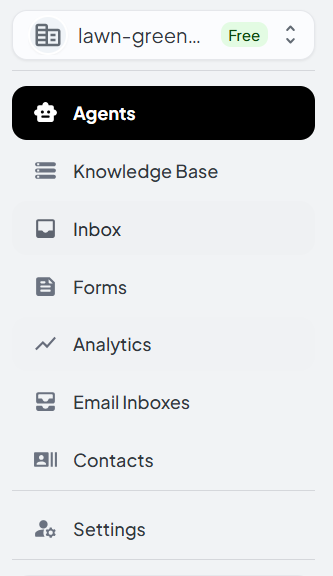
1. Agents
Agents are AI-powered assistants that respond to user queries using connected Knowledge Base.
Key capabilities:
- Create and manage AI agents
- Define agent behavior and tone
- Assign Knowledge Base to agents
- Enable or disable agents per channel
Use case: Create different agents for support, sales, internal knowledge, or documentation.
2. Knowledge Base
Knowledge Base act as the knowledge repository for your AI agents.
What a Knowledge Base contains:
- Documents (PDF, DOCX, TXT, etc.)
- Web pages and URLs
- Notion pages or other integrations
How it works:
Once data is added, it is processed and vectorized so AI agents can retrieve accurate answers.
Use case: Train AI agents with product docs, FAQs, policies, or internal knowledge.
3. Inbox
Inbox is the central place to view and manage all incoming conversations.
What you can do:
- View real-time conversations
- Reply to users manually
- Monitor AI-generated responses
- Take over conversations when needed
Use case: Support teams can handle user queries, review AI responses, and ensure quality communication.
4. Forms (Beta)
Forms allow you to collect structured user input directly through conversational or embedded forms.
Features:
- Create custom forms
- Capture leads or feedback
- Integrate form data with agents
Use case: Lead generation, surveys, onboarding questionnaires, or support ticket creation.
6. Email Inboxes
Email Inboxes allow Chatbix AI to manage email-based conversations.
Capabilities:
- Connect support email addresses
- View emails in a unified inbox
- Let AI assist in drafting replies
- Respond manually or automatically
Use case: Centralize email support and enhance it with AI assistance.
7. Contacts
Contacts stores information about users interacting with your agents.
Features:
- View user profiles
- Conversation history per contact
- Tags and metadata
- Email and channel details
Use case: Maintain customer context and personalize conversations.
8. Settings
Settings allows you to configure platform-wide options.
Common settings include:
- Workspace configuration
- Team members & roles
- Security preferences
- Branding options
Use case: Admin-level control over access, integrations, and system behavior.
Sidebar Navigation Best Practices
- Start by creating Knowledge Base
- Assign Knowledge Base to Agents
- Test responses via Inbox
- Monitor performance in Analytics
- Fine-tune behavior in Settings